Graphics Factory, an innovator in online graphics, is one of the LARGEST providers of original clip art graphics and animations in the world. Graphics Factory is a trusted leader with a track record of satisfied customers.
Downloading royalty free graphics, clip art, and images is easy! In just a few seconds you'll have access to hundreds of thousands of images for everyday use at work, home, and for fun. Plus, new fonts, clip art, templates and other images are added monthly!
How Do I Join?
To become a member of Graphics Factory.com you can use our secure online ordering form or send us a purchase order. Once you join you will have access to our entire collection of original royalty-free images.
Members: If you're having a problem when you try to sign in click here to clear your login sessions. Then sign in again and let us know if you continue to have problems.
Contact Information
Clip Art, Inc. dba GraphicsFactory.com
2051 E Red Hills Pkwy #2
Saint George, UT 84790
1-800-339-2383 or 1-435-656-1310
Join Today! - Members Sign In
Web Page Builder Use this tool to make a basic Web page by filling in the blanks.
META Tag Generator Make META tags for your site with ease using this tool. You can add your page title, keywords, descriptions, spider options, redirects, and transitions.
Duplicate Remover This tool will remove duplicates from list of Emails or words.
Building a Web site tutorial This is a two page tutorial that will walk you through building a Web site from scratch. You will learn the basics about HTML tags, which will get you started in being able to read HTML and build Web pages.
HTML Special Characters Grab the correct code for those hard to find special characters in HTML.
Using SSI Includes Learn some advanced HTML techiques that can save you a load of time.
HTML Page Margins Learn how to control your HTML page margins and gain total control of your Web pages.
MouseOver JavaScript This JavaScript will allow you to have an interactive menu bar by swapping images when the mouse is moved over it.
Image Size Explained It's important to know how to optimize your images, this article will show you how.
GIF or JPG? Learn what the difference is between .gif and .jpg images. This article will show you when and why to use these formats.
Favorites
What is the Favorites feature?
The Favorites is an area where you can save your favorite images for fast and easy access later. You do not need to use the Favorites feature to download images. Favorites are great for saving images that you are interested in but don't want to download now.
If you would like to share your Favorites with someone without giving them your username and password you can make your Favorites public. This will allow others to see your Favorites without having to sign-in.
NOTE: Only members can save images to their Favorites.
Viewing your Favorites
View your Favorites by clicking the Favorites link on the top menu bar. These options will then be available.
My Favorites :
Shows a list of your Favorite folders.
Add Folder :
Allows you to create a new Favorites folders.
Preferences :
Change your Favorites display options.
User List :
Shows a list of public Favorites. If you would like to share your Favorites with someone without giving them your username and password you can make your Favorites folder public. This will allow them to see your Favorites without having to sign-in.
NOTE: Images will be saved to your default Favorites folder. So if you want to save images to a certain Favorites folder make sure you have that folder marked as the default.
Change your password
Change your Email address
See how many days you have left until your membership expires
Renew your membership
Change membership plan
Cancel membership
Update payment information
You must be signed in to edit your membership information. If you haven't signed in you will not see the link to edit your membership information. You can sign-in here and then click the Edit/Renew link on the menu or click your username in the top right hand corner of the page.
It's fun and easy to be a member of GraphicsFactory.com. Use our secure online registration page to create your membership and start downloading images today.
Members Enjoy :
Unlimited Downloads
Free weekly updates
Image search engine for finding images fast
Original and exclusive images that can only be found here
Royalty-Free usage rights
Will my membership renew automatically?
Yes, GraphicsFactory.com memberships will renew automatically. You can easily cancel your membership anytime if you not choose to renew you membership.
You can use our online form to have your member information instantly emailed to the email address on file. You will receive the username and password for your membership.
First make sure you're using the correct member information by using our our online form to have your membership information Emailed to you.
Most Common Mistakes:
Using your Email address as your username
Not capitalizing the correct letters. The login process is case sensitive.
Not allowing cookies from GraphicsFactory.com
If you're having problems signing into GraphicsFactory.com and you're entering your username and password correctly it is probably a cookie issue. Make sure you allow cookies from GraphicsFactory.com, that's how we recognize you as a member.
If you have any Anti-Virus programs or cookie blockers running they will need to be set to allow cookies from GraphicsFactory.com. Once you do this you will not have any problems signing in.
High Resolution Images :
GraphicsFactory.com provides high-resolution (300dpi) clipart images that are fully editable, resizable, and printable. You can use our high-resolution clipart images for printing, vinyl signs, vehicles graphics, and more. The formats provided are .EPS and .WMF.
Image Rights
All clip art usage is governed by the terms of individual copyrights and usage rights. The copyright and usage rights of a clip art image are important to understand so that the image is used in a legal, permitted way. The three most common categories of image rights are royalty free, rights managed, and public domain.
Most commercial clip art is sold with a limited royalty free license which allows customers to use the image for most personal, educational and non-profit applications. Some royalty free clip art also includes limited commercial rights (the right to use images in for-profit products). However, royalty free image rights often vary from vendor to vendor.
Some fine art clip art is still sold on a rights managed basis. However this type of image rights have seen a steep decline in the past 20 years as royalty free licenses have become the preferred model for clip art.
Public domain images continue to be one of the most popular types of clip art because the image rights are free. However, many images are erroneously described as part of the public domain are actually copyrighted, and thus illegal to use without proper permissions. The main cause for this confusion is due to the fact that once a public domain image is redrawn or edited in any way, it becomes a brand new image which is copyrightable by the editor.
The United States District Court ruled in 1999 as part of Bridgeman Art Library v. Corel Corp that exact copies of public domain images were not protected by US copyright law, however the scope of this ruling only applies to photographs currently. It is originality, not skill, experience or effort, which affects copyrightability of derivative images. In fact, the US Supreme Court in Feist v. Rural ruled that the difficulty of labor and expenses must be rejected as considerations in copyrightability. So until the courts rule otherwise, it is generally accepted that the creativity required to reproduce an illustration by hand is intrinsically original, and therefore protected by copyright law.
For example, the large clip art libraries produced by Dover Publications or the University of South Florida's Clipart ETC project are based on public domain images, but because they have been scanned and edited by hand, they are now copyrighted images, subject to very specific usage policies. In order for a clip art image based on a public domain source to be truly in the public domain, you must have the proper rights granted to you by the individual or organization which digitized and edited the original source of the image (for example, an original book).
The popularity of the Web has facilitated widespread copying of pirated clip art which is then sold or given away as "free clip art". The reality is that most clip art touted as "free" is actually illegally distributed. Virtually all images published after January 1, 1923 still enjoy copyright protection under the federal laws of most countries. Images published prior to 1923 need to be carefully researched to make sure they are in the public domain.
The exception for clip art illustrations created after 1923 are those which are specifically donated to the public domain by the artist or publisher. For vector art, the open source community established the Open Clip Art Library in 2004 as a clearinghouse for images which are legitimately donated to the public domain by their copyright owners. By 2006, the library contained over 6,500 images.
----
Royalty-Free images can be used multiple times, in multiple projects for a one-time fee. Download the images once and use them forever without having to pay any additional fees.
How to remove the watermark?
Images displayed at GraphicsFactory.com have a watermark (CLIP ART INC or Graphics Factory) on them. The watermark is designed to allow you to view all images without having to join first. The images you download will not have our watermark on them.
What images formats are available to members?
GraphicsFactory provides all the popular image formats for maximum compatibility with your favorite programs. All members have instant access to Web-ready images and printable vector clip art. For more information on the different formats available read our image formats page.
As a Member of GraphicsFactory.com you can continue to use the images you download forever, even after your membership expires.
Download Option 1: My Download Basket
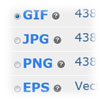
You can download multiple images by adding them to your download basket. Under each image you will see a selection circle next to each format available. Select the format you want and click the Add to Basket button.
When ready to download your basket click the BASKET link on the top menu bar and from there you will see a Zip My Files button, which will zip all of your images into one zip file for fast and easy downloading. For help opening .zip files read our zip file tutorial.
From your Download Basket you can :
Remove all or single images from your basket
Download all files at once
Download Option 2: Download Without using your basket
You can also download any image quickly without using the download basket by clicking the format available. Click the format you want and you will get prompted with a Save Image box, choose the location on your computer you want to save your image and you're done.
NOTE: The clip art images you download will not have our watermark on them.